Home and Community Support

Providing everything from a little help to specialised care, our flexible Home and Community Support services cover home nursing, home assistance and allied health.

Learn more
At Home Support-Salmon-RGB

Support at Home

If you have been assigned a package or want to know more, we’re here to help.

CALL US TODAY

Specialised services

From community education programs to research and digital innovation, we co-design services to support you to live your life, your way.

Learn more
Adjust font size

McKenzie Aged Care Group

Payroll review

About

In 2023, McKenzie Aged Care Group (MACG) was acquired by Bolton Clarke. As part of the integration process, Bolton Clarke has completed a review of historical McKenzie Aged Care Group payroll practices. This review identified that certain clauses in all four MACG Enterprise Agreements had been incorrectly interpreted, affecting the entitlements of some McKenzie Aged Care Group employees.

We sincerely apologise to those impacted by these errors. We are working to resolve the matter as quickly as possible through a structured remediation program. Our goal is to ensure that all affected individuals receive the payments owed to them, including interest and any applicable superannuation contributions. 

I have received a letter, what do I do next?

Your letter will advise whether you are entitled to a remediation payment.  If you are entitled to a payment, please complete the verification process as soon as possible via our Secure Payments Portal, linked below. 

Visit the Secure Payments Portal >

Next steps

These steps are essential to verify your details and enables us to process your remediation payment using the updated information you provide.

step-0

Step 1

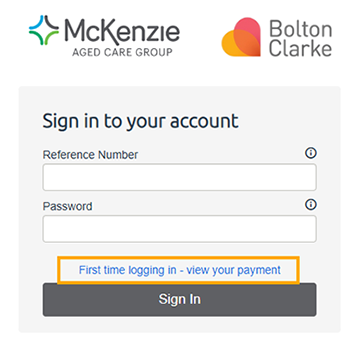
Open the Secure Payments Portal using the link above and then select ‘First time logging in – view your payment’ as marked in the image below.
 
sign in

step-1

Step 2

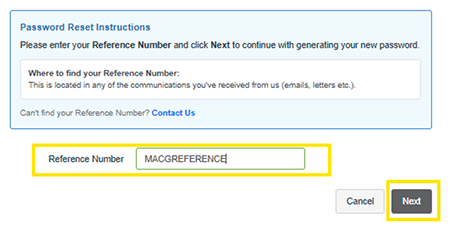
You will need to enter your Reference Number from the letter emailed to receive and then click next.

Reference

step-2

Step 3

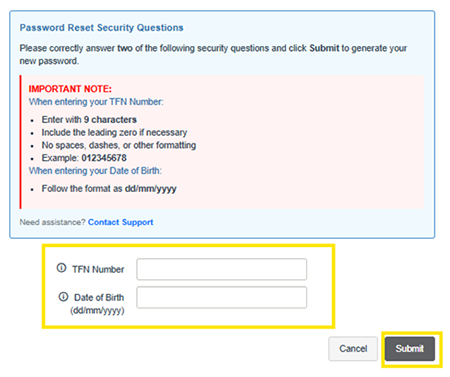
Enter your Tax File Number and Date of Birth to verify your identity and then click submit to obtain your login details.

Security questions

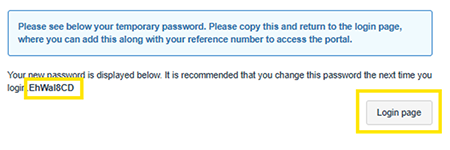
Copy the password so you can login.

password

step-3

Step 4

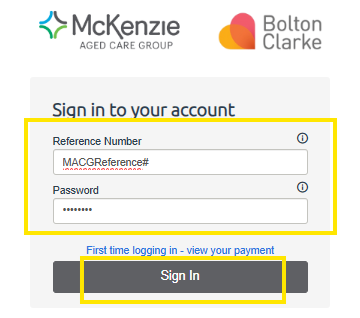
Using your reference number and password, login to the portal.

Login details

step-4

Step 5

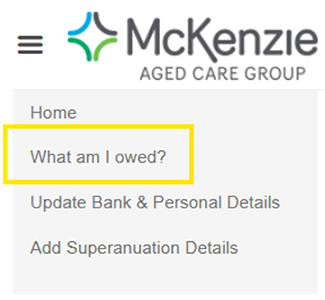
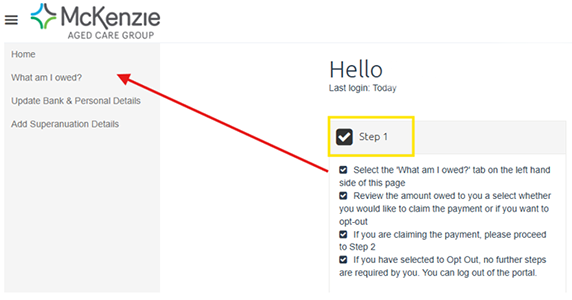
Follow through the steps listed on the main page starting with ‘What am I owed?’ and continue until you have completed the steps.

Navigation

step-5

Step 6

Once you have completed the steps, you will receive an acknowledgement email to verify that you have successfully submitted your details for the remediation payment.

Need help?

If you are having trouble registering for the secure payments portal, please contact boltonclarke@nlcpayroll.com

If you have any concerns about accessing or registering on the portal, you can verify the legitimacy of this process by contacting our dedicated support team via:
1800 334 206 

Email

Keeping your data safe and confidential

As part of this remediation process, Bolton Clarke is committed to protecting your personal information with the highest standards of security and confidentiality. 

We have engaged YourCall as our trusted provider for helpline and enquiry management services, offering independent and confidential support. 

We have also partnered with NLC PayGlobal to deliver our Secure Payments Portal. NLC PayGlobal is a specialised and accredited payroll provider with global operations and strong data protection practices in place to safeguard your personal information.  

You may receive a phone call or SMS reminder to complete your information in the Secure Payments Portal. Emails regarding your remediation will come from emails ending in boltonclarke.com.au or yourcall.com.au. 

If you have any concerns about accessing or registering on the portal, you can verify the legitimacy of this process by contacting our dedicated support team via: 

Telephone: 1800 334 206 

Email: MACGpayreview@yourcall.com.au 

These arrangements are in place to give you confidence that your information is being managed with care throughout the remediation process. 

More information is also available through our Frequently Asked Questions located below.

Frequently asked questions

What has happened?

Bolton Clarke has undertaken an investigation into the potential incorrect interpretation of certain clauses in the following four Enterprise Agreements:

  • McKenzie Aged Care Group Enterprise Agreement 2016
  • McKenzie Aged Care, ANMF and HSU Enterprise Agreement 2016
  • McKenzie Aged Care (Glasshouse Views, Seabrook, Bribie Cove) Enterprise Agreement 2016
  • Embracia Aged Care Victoria Enterprise Agreement 2013-2017

Through the course of this investigation, it was determined that some employees who were covered under these agreements had been underpaid certain entitlements dating back to 26 December 2016.

We are sorry to anyone impacted by these errors and are working to rectify this as quickly as possible through a remediation program.  We have self-reported this issue to the Fair Work Ombudsman and have engaged with independent payroll and legal specialists to support remediation.

Our goal is to ensure that anyone impacted receives the remediation payment owed, along with interest and any applicable superannuation contributions.

Who is impacted?

Some employees who were covered by the following Enterprise Agreements have been identified as being underpaid some of their entitlements: 

  • McKenzie Aged Care Group Enterprise Agreement 2016 
  • McKenzie Aged Care, ANMF and HSU Enterprise Agreement 2016 
  • McKenzie Aged Care (Glasshouse Views, Seabrook, Bribie Cove) Enterprise Agreement 2016 
  • Embracia Aged Care Victoria Enterprise Agreement 2013-2017

All former employees were initially contacted via email and SMS and those owed a remediation payment have been requested to register their details and up-to-date information through a secure payments portal. For employees we have not been able to reach by SMS or email, we will also send a mailed letter with reminders to their last known contact details.

What is the look back period for this payroll review?

Bolton Clarke has reviewed all historical McKenzie Aged Care payroll records from 26 December 2016 onwards.

How do I know if I am impacted?

All current and former employees have been contacted with details about the review and their remediation outcomes. If you have not received any communication, this means you were not identified as being employed under the Enterprise Agreements and no further action is required.

If you have not received a letter or email from us, but believe  you have been impacted, please contact our dedicated support team on 1800 334 206 or email MACGpayreview@yourcall.com.au.  

What do I need to do as an impacted person?

If you have received an email with a letter informing you that you are owed a remediation payment, please follow the verification steps outlined in that letter. This includes confirming your identity and submitting your up-to-date personal, banking, and superannuation details via the Secure Payments Portal, managed by our trusted partner, NLC Payroll.

Once your information has been submitted and verified, your remediation payment will be processed, and you will receive a detailed outcome letter outlining the breakdown of your payment.

I am a former employee, how will I receive details about my remediation payment?

If you are eligible for a remediation payment, you will have received a letter with instructions and a link to our Secure Payments Portal.

To receive your payment, you must complete the verification process by providing up-to-date personal, banking, and superannuation information through the portal.

Your remediation payment will be processed within four weeks of your information being submitted and verified. Please follow the instructions in your letter carefully to avoid any delays.  

How can I login and navigate the secure payments portal?

How to login

  1. Open the Secure Payments Portal using the link above or here and then select ‘First time logging in – view your payment’ as marked in the image below.
    Sign in

  2. Enter the Reference Number. Please refer to the letter emailed to you to obtain your reference number to login to the portal. Then, click 'Next'.
    Enter reference number

  3.  The following screen will appear. On the New Password page, only answer 2 of the 2 security questions correctly, then click 'Submit'. The answers to the questions must be entered in the correct format. 

    By hovering over this icon ‘ⓘ’ you will be able to view the explanation on the correct format to use when entering your details. The details must also match the information currently held in the payroll system.
    Password reset

  4. Your new password will be displayed in bold on this page.

    Copy your password then click 'Login page' this will take you back to the Sign in page.
    Copy password

  5. Enter your Reference Number then paste in your Password and click 'Sign In'.
    Sign in with reference


Navigating the Secure Payroll Review Portal

  1. Step 1 Complete 'What am I owed?'
    What am I owed

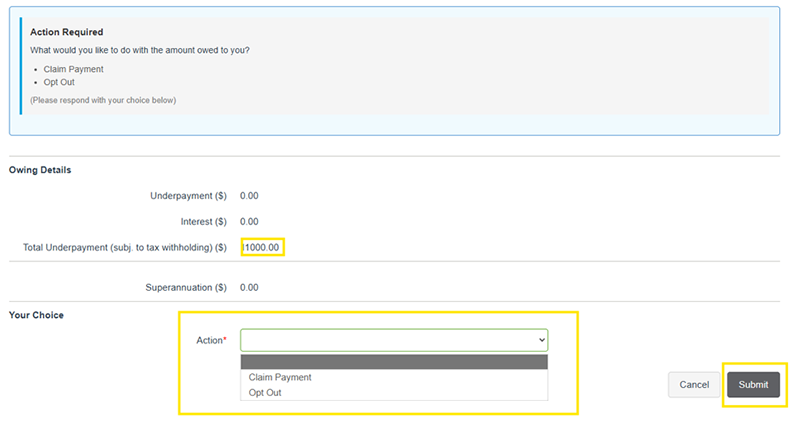
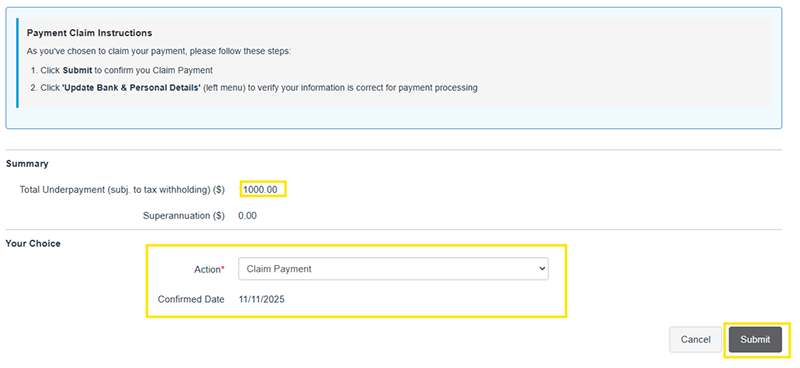
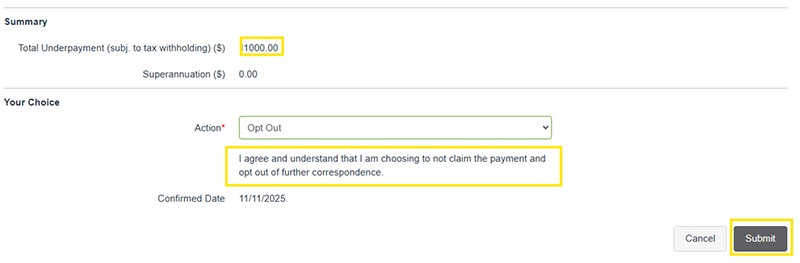
    1. Select what you would like to do with the amount owed to you.
      Payment options


    2. Claim payment
      claim

    3. Opt out of payment
      opt out
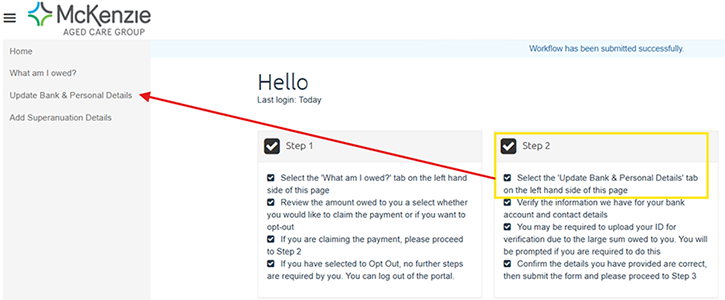
  2. Step 2 'Update Bank & Personal Details'
    Step 2 personal details

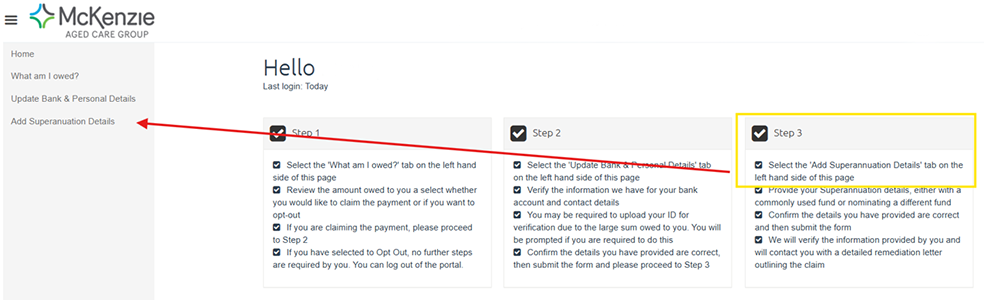
  3. Step 3 'Add Superannuation Details'
    Step 3 Superannuation


I was a salaried employee at McKenzie Aged Care Group. Have I been included in this payroll review?

Employees at McKenzie Aged Care Group who were not employed under the following Enterprise Agreements have not been reviewed as part of this payroll review:

  • McKenzie Aged Care Group Enterprise Agreement 2016
  • McKenzie Aged Care, ANMF and HSU Enterprise Agreement 2016
  • McKenzie Aged Care (Glasshouse Views, Seabrook, Bribie Cove) Enterprise Agreement 2016
  • Embracia Aged Care Victoria Enterprise Agreement 2013-2017
What if I have not received a letter?

The payroll review extensively evaluated all employees who worked during the review period. If you did not receive a letter, the review has found that you were not employed under one of the McKenzie Aged Care Enterprise Agreements during the period of review.

Letters are being sent to former employees to their last known contact details.

If you have not received a letter and have changed your email or mailing address, please contact our support team by emailing MACGpayreview@yourcall.com.au or calling 1800 334 206.

I am the executor or administrator of the estate of a former employee. How do I complete the verification process?

If you are the legal personal representative of a deceased former employee, please contact our dedicated support team by calling 1800 334 206 or emailing MACGpayreview@yourcall.com.au.

To proceed, you will need to provide evidence of your authority, such as a grant of probate or letters of administration. This documentation confirms your legal status to act on behalf of the estate.

I am no longer living in Australia - how do I obtain my remediation payment?

If you are currently residing outside Australia, we strongly encourage you to provide an Australian bank account on the Secure Payments Portal for your remediation payment, as this will allow for faster, more secure, and more efficient processing.

If you do not have access to an Australian bank account, you will need to contact us to request an International Banking Details Form. This form must be completed and returned to enable payment to an overseas account. Please note that all remediation payments will be made in Australian Dollars.

Superannuation entitlements, if applicable, must be paid into an Australian superannuation fund as required by law. If you no longer have an active Australian superannuation account, you can choose to open one with our default fund, HESTA, and provide those details via the portal.

Please note that income tax will be withheld from your remediation payment and paid to the Australian Taxation Office (ATO). If you have questions about how this may affect you, we recommend contacting a financial or tax advisor. Any advice obtained will be at your own cost.

What do I do if I cannot verify my details on the Secure Payments Portal?

If you do not have access to the internet or are unable to complete the process online, please contact our dedicated support team on 1800 334 206. They will assist you in arranging an alternative method to complete your registration and ensure your remediation payment can be processed.

What is a remediation payment?

A remediation payment is a payment made to employees who have been identified as having received less than their correct entitlements under an Enterprise Agreement. A remediation payment is commonly made up of the underpaid amount, along with interest. Superannuation may also be paid on the amount dependent on what entitlements are owed to you.

Our goal is to ensure that anyone who is impacted receives the remediation payment owed, along with interest and any applicable superannuation contributions.

A breakdown of your remediation payment will be provided in the letter you receive after registering your details through the secure payments portal.

Will interest be paid on the remediation payment?

Yes. Bolton Clarke is calculating and paying interest on all remediation payments as part of the payroll review. To ensure fair and equitable compensation for delayed employee payments, we have used the Federal Court pre-judgment interest rate methodology. This involves applying a rate that combines the Reserve Bank of Australia’s cash rate with a standard 4% uplift, consistent with legal practice. The interest is calculated across the relevant time periods using official rates published for each half-year.

If you are eligible for a remediation payment, the interest amount is included in your total and is detailed in the letter you received outlining your individual payment breakdown.

Will superannuation be paid on the remediation payment?

Yes. Bolton Clarke is paying superannuation on all applicable remediation payments in accordance with the Superannuation Guarantee (Administration) Act 1992 (Cth).

Superannuation contributions will be paid separately to the fund you nominate during the verification process via the Secure Payments Portal.

Is tax withheld from remediation payments?

Yes. Remediation payments are subject to tax withholding and are reported to the ATO in line with Bolton Clarke’s obligations.

We recommend speaking with the ATO or a qualified financial or tax advisor regarding your personal circumstances.

What tax rate will apply to my remediation payment?

Remediation payments are treated as salary and wages for tax purposes. To ensure consistency and fairness across all impacted employees, a marginal tax rate of 32% will be applied to these payments.

If your remediation payment relates to previous financial years, we will report this to the ATO as Lump Sum E. This will mean the payment is recognised for the financial years it relates to rather than in the current financial year. Please find out more information about Lump Sum E from the ATO here.

For personalised advice, we recommend contacting the ATO or speaking with a qualified financial or tax advisor.

Which bank account will this payment be made into?

You will need to verify your identity and provide up-to-date bank and superannuation details via the Secure Payments Portal for your payment to be processed. This step is essential to ensure your remediation payment is processed correctly and securely to your nominated account.

Will any impacted employees be asked to pay back money based on the investigation findings?

No.

Impacted employees will not be asked to repay any money.

How can I be confident that the remediation payment amounts are accurate?

The remediation process was conducted engaging with independent payroll and legal specialists. It involved a comprehensive review of payroll, timesheet, and time and attendance data to ensure accuracy. Where a remediation payment was identified, interest and any applicable superannuation contributions were also calculated and included.

If you have additional questions or need further clarification, please do not hesitate to ask us by emailing MACGpayreview@yourcall.com.au or calling 1800 334 206.  

If I have been underpaid, will this be kept confidential by Bolton Clarke?

Yes. 

Your remediation payment details and personal information will remain confidential and will be handled in accordance with Bolton Clarke’s Privacy Policy.

Your information will only be used for the purpose of reviewing and processing your remediation payment. 

To support this process, we have engaged trusted third-party providers:

  • YourCall, for independent helpline and enquiry management services
  • NLC Payroll, a Secure Payments Portal provider. NLC Payroll is a specialised and accredited payroll provider with global operations and strong privacy and data protection standards

In some cases, your information may be shared with entities such as the Australian Taxation Office (ATO) and your nominated superannuation fund, but only where necessary to complete your remediation payment.

How can I be sure that communications about the MACG Payroll Review are genuine?

Any official communication regarding the McKenzie Payroll Review will come from a Bolton Clarke email address or from MACGpayreview@yourcall.com.au. In addition, the trusted information web page is www.boltonclarke.com.au/macgpayreview.

To assist with the remediation process, Bolton Clarke has engaged with two trusted partners.

Bolton Clarke has engaged YourCall to manage helpline and enquiry services. We have also partnered with NLC Payroll to provide the Secure Payments Portal. Both organisations have been carefully selected for their reliability and commitment to data privacy and security.

If you are ever unsure about the legitimacy of a message or request, you can verify it by contacting our dedicated support team on 1800 334 206 or by visiting our official website at www.boltonclarke.com.au/MACGPayReview.  

Who is the secure payments portal provider, NLC PayGlobal?

NLC Payroll is the trusted provider of our Secure Payments Portal, used to verify the details of former employees who are part of the remediation program.

Bolton Clarke has engaged NLC Payroll specifically for this purpose.  As an accredited and trusted provider NLC Payroll adhere to industry standards for confidentiality, privacy, and data security requirements. This ensures that your personal information is protected and handled securely throughout the remediation process.

Your data will only be used for the purpose of verifying your identity and processing your remediation payment. You can find more information about NLC Payroll here.

Who is the dedicated support team, YourCall?

Bolton Clarke has engaged YourCall to manage the dedicated helpline (1800 334 206) and enquiries email (MACGpayreview@yourcall.com.au) for the McKenzie Payroll Review.

YourCall is a trusted Australian provider of independent reporting and support services. As part of their engagement, they have agreed to strict confidentiality, privacy, and data security requirements to ensure your personal information is handled securely and respectfully.

You can learn more about YourCall by visiting their website at www.yourcall.com.au.  

Why has it taken so long since acquiring McKenzie Aged Care Group to finalise the review?

The review has taken time because it needed to be thorough and accurate for everyone affected. We reviewed several years of payroll and timesheet data across multiple Enterprise Agreements, with independent legal and payroll specialists involved to ensure fairness. We apologise for the delay and appreciate your patience as we worked to get this right. 

How do I ask questions about my remediation payment?

If you have questions that are not addressed in these FAQs, please contact our dedicated support team, operated by YourCall, by calling 1800 334 206 or emailing MACGpayreview@yourcall.com.au.

YourCall is an independent and trusted provider engaged by Bolton Clarke to manage helpline and enquiry services for the McKenzie Payroll Review.  

I believe my remediation calculation is incorrect, what do I do?

The remediation payment calculations have undergone a thorough review process involving independent legal and payroll specialists.

If you believe there is an error in your calculation, please email MACGpayreview@yourcall.com.au with the subject line: "Request for reassessment – [Your Name]". Be sure to include a copy of the original letter you received and a detailed explanation of the discrepancy you believe exists.